Our social:

Latest Post

Showing posts with label mobile hacking. Show all posts

Friday, May 23, 2014

Easiest Way to Install Backtrack in an Android Device | with Full Tutorial 2014

Click on image to zoom

Hello guys, today I'm going to show you the easiest way to install backtrack on an android device. For this tutorial you need:


All of the programs mentioned above are free. Ok, now let's start, The first thing you need to do is install Busybox on from Google Play :

Click on image to zoom
Install it, then open it when it's done, it will install some more things. When it's done, install Linux Installer from Google Play:

Click on image to ZOOM
Open Linux installer, then click on Install Guides from the list on your right hand side:


When you click that, you'll see a list of Linux distros, click on Backtrack and you will see a screen with steps on how to install it. Now click on the second page of those steps, you will get a page that looks like this:


Just click on "Download Image", and let it finish downloading. While it's downloading, open Google play and install Terminal Emulator, and Zarchiver.


When it finishes downloading, open Zarchiver, and look for the ZIP file that you downloaded, and extraxt the image into a root folder called "backtrack", extract the image into an external memory card not the internal one. Once it's done, open Linux Installer again, and click on launch, you'll get a screen that looks like this:


If it didn't recognize any distro, click on Setting > Edit then change the file path there to your backtrack image, the .img file that you extracted. When it finally say "backtrack" on the drop down list, click "Start Linux"  Terminal Emulator will open, you just have to proceed with the installation steps, ask you for a new password, and some preferences. When it's done you will get a red "root@localhost~#" like the picture bellow:


You are now in backtrack! 
Now if you want backtrack in GUI, open Google play, and install Android VNC:


Open It when it finishes installing, and it will look like this:


Set to the same settings in the picture, but not the IP address, you can get your IP by opening backtrack terminal, in terminal emulator, and running "ifconfig" command:


Settings for VNC are, 
Username: backtrack 
Password: backtrac 
IP: from the "ifconfig" 
command or just put 127.0.0.1  
Color Format: 24-bit Now click connect, and boom! 

You'r in backtrack Desktop! ;)


When you finis using it, remember to disconnect VNC  AND exit backtrack in Terminal Emulator, else it will be taking your battery in the background.


And note that Ubuntu can be installed in the same exact way, just the username and password for VNC will change. That's it guys, enjoy! :)


Wednesday, November 20, 2013

Download Clash of Clans Hack-Gems,Coins,Elixirs | No survey No ad direct link download |

Description:
Clash of Clans Hack ToolI hope you are happy now. One user has send us an email that he want to make a hack for Clash of Clans, after I discuss with my team workerswe decided to make this wish to be real, even if not Christmas, I joked. So, this is for you Brandon .N . With this hack you and our users can generate an unlimited amount of Gems, Coins and Elexirs. We developed this hack on our new platform HR v.2. Our hack have a friendly interface and it’s perfectly safe because we use ProxyPro vers.8 to provide safety to ours users. So what we do? We developed this hack aprox. 7 days ago and we have tested, tested and tested this hack every day, to be sure that our users are in safe. And it has, our account don’t have any problem, is working right now.

Instruction:
1. Download Clash of Clans Hack Tool Archive by clicking the download button above. 2. Save the file in your computer and open it (You will need to UnRAR). 3. Open Clash of Clans Hack Tool.exe, plug your phone to PC, select your OS (Operating System) hit the Detect Device button or simply press on Auto Detect, and complete with the amount of resources you want to generate. 4. Next hit ‘Android or iOS’ button and leave the hack to do his job. 5. Finally enjoy, and remember to share with friends! If you have any problem with this generator after you downloaded it, you can contact our team at admin@hackreleases.com and we will respond as quickly as possible!

features:
 generate unlimited no. of gems,coins,elexirs
hack preview

DOWNLOAD:

Thursday, August 22, 2013

How To Unlock Password Protected Memory Card

Unlock password protected

Memory Cards are widely  storage media that are used to store digital information. Most of a users store music, videos and photos in a memory cards. Many of us use password to protect memory card. But some time we or our friends forgot password and then we stressed about it.The usually solution left is to Format a memory from your mobile phones.

Follow These steps below :
  • But here we have simple process to recover forgotten password Without Formatting
  • First download [FExplorer from here]
  • Now run FExplorer
  • Find & open the path C:\system. 
  • there you find the file mmc store and copy it to your PC. 
  • Open that file using notepad, you will find the password in that text file.

Friday, August 16, 2013

Jail Break via Redsnow Free Download Links for | MAC | Windows | Linux

Redsnow

What is RedSn0w?
RedSn0w is a jailbreak tool developed by the Dev-Team. Originally called QuickPWN, this jailbreak tool was quickly renamed, and has now become a household name for most jailbreakers. Unlike PwnageTool, RedSn0w works for both Mac and Windows, and is considered to be one of the most reliable jailbreaks by the whole community.

What Device and iOS Version Can RedSn0w Be Used With?

To date, RedSn0w can be used to jailbreak the following iOS devices:

  • iPhone 5: Yes
  • iPhone 4S: iOS 5.1.1, iOS 5.0.1, iOS 5.0
  • iPhone 4: iOS 6.0.1, , iOS 6, iOS 5.1.1, iOS 5.1, iOS 5.0.1, iOS 5, 4.3.5, 4.3.4, 4.3.3, 4.3.2, 4.3.1, 4.3, 4.2.6, 4.2.1, 4.1, 4.0.2, 4.0.1, 4.0, 3.1.3
  • iPhone 3GS: iOS 6.0.1, iOS 6, iOS 5.1.1, iOS 5.1, iOS 5.0.1, iOS 5, 4.3.5, 4.3.4, 4.3.3, 4.3.2, 4.3.1, 4.3, 4.2.6, 4.2.1, 4.1, 4.0.2, 4.0.1, 4.0, 3.1.3
  • iPhone 3G: 4.2.1, 4.1, 4.0.2, 4.0.1, 4.0, 3.1.3
  • iPad 3: iOS 5.1.1
  • iPad 2: iOS 5.1.1, iOS 5.0.1
  • iPad 1: iOS 6, iOS 5.1.1, iOS 5.1, iOS 5.0.1, iOS 5, 4.3.5, 4.3.4, 4.3.3, 4.3.2, 4.3.1, 4.3, 4.2.1, 3.2.2
  • iPod Touch 4G: iOS 6.0.1, iOS 6, iOS 5.1.1, iOS 5.1, iOS 5.0.1, iOS 5, 4.3.5, 4.3.4, 4.3.3, 4.3.2, 4.3.1, 4.3, 4.2.1, 4.1, 4.0.2, 4.0.1, 4.0, 3.1.3
  • iPod Touch 3G: iOS 5.1.1, iOS 5.1, iOS 5.0.1, iOS 5, 4.3.5, 4.3.4, 4.3.3, 4.3.2, 4.3.1, 4.3, 4.2.1, 4.1, 4.0.2, 4.0.1, 4.0, 3.1.3
  • iPod Touch 2G: 4.3.4, 4.2.1, 4.1, 4.0.2, 4.0.1, 4.0, 3.1.3

This list will be updated as new versions of RedSn0w are released.
Mirror via Direct Link


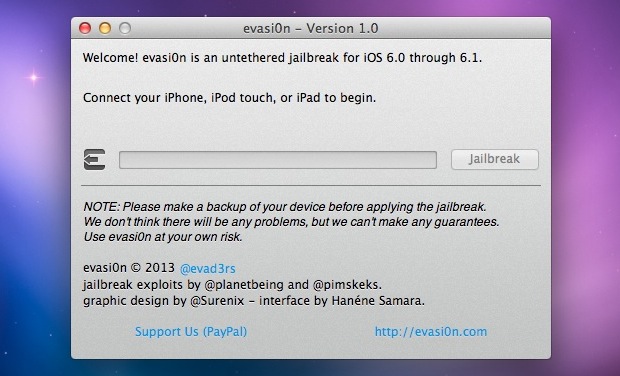
Jail Break via Evasion Latest Version Free Download for | MAC | Windows | Linux Direct Link

EVASION

Important! Read me!


  • Backup your device using iTunes (or iCloud) before using evasi0n. If something breaks, you'll always be able to recover your data.
  • Please disable the lock passcode of your iOS device before using evasi0n. It can cause issues.
  • Avoid all iOS and iTunes related tasks until evasi0n is complete. Why not just enjoy a brief break from the computer to stretch your legs?
  • If the process gets stuck somewhere, it's safe to restart the program, reboot the device (if necessary by holding down Power and Home until it shuts down), and rerun the process.
  • If you get an error on OS X 10.8 saying that evasi0n can't be opened, control-click (or right-click) the app and on the revealed context menu, choose 'Open.' On the ensuing dialogue box, choose 'Open' as well.

Screenshot
Requirements

  • 5 minutes of your time!
  • A computer, running Windows (XP minimum), Mac OS X (10.6 minimum) or Linux (x86 / x86_64)
  • iTunes installed if you're running Windows
  • An iPhone, iPad or iPod running iOS 6.0 through 6.1.2 (you may check in Settings / General / About => Version)
  • A USB cable to connect the device to the computer
Mirror via Direct Link


Friday, July 26, 2013

Hackers Home Pro apk Updated Version Free Download For Android Devices with Mediafire Links

Hacker Home Pro

Description :


This is the Pro Version of Hackers Home which contains More Bunch of tutorials about :
✔ Computer Hacking
✔ WiFi Hacking
✔ Instant Facebook Hacks Tutorial
✔ Hacking Website
✔ Email Hacking
✔ Protect Yourself
✔ Backtrack 5 tutorials
✔ Windows Tricks and Hacking
✔ Notepad Hacks
✔ Regular updates
✔ Ads Free
★ More Amazing Stuffs
===================================
Wanna learn to hack? Let us show you how!
Hacker’s Home is the 1st android app ever in the Google Play Store which includes tons of stuffs relating Hacking Computer,Computer Hacks/Tricks, Wi-Fi, Website, Facebook, Emails with step by step tutorials and with live chat functionality which let you stay tuned with the hackers all around the globe.
Note: - This Application is only for education purpose and is 100% safe. This application is designed by the developer for the reference only.
===================================
This App Contains Step by step 1,730 Tutorials, Some of the list are as Follows :
✔ Protect Your own accounts from being hacked
✔ Strong your own security
✔ Use your android phone to gain access to facebook, youtube, twitter, amazon accounts
✔ Hack Websites with SQL injection and other methods
✔ Hack Gmail, Yahoo & Msn Accounts
✔ Crack Wifi WEP and WPA passwords
✔ Gain access to e-mail accounts
✔ Hack Facebook accounts
✔ Bypassing school security
✔ Speed up your internet connection on ps3, xbox, PC, or mac
✔ Hacking websites with SQL injection
✔ Hacking and cracking Wi-Fi by bypassing securities
✔ Speed up your internet and optimize your PC
✔ Setup Backtrack
✔ Backtrack 5 Tutorials
✔ Some Interesting Windows Tricks
✔ Password Cracking Tutorials
✔ How to create Viruses
✔ Video Tutorials
+ Many More
===================================

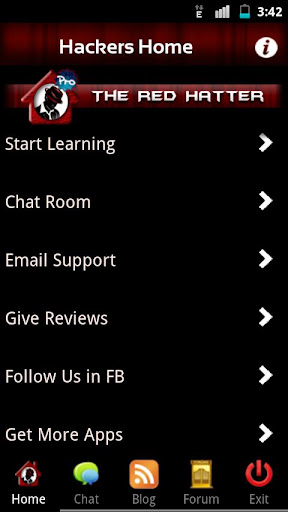
Screenshot


This ebook will constantly be updated with new guides and tutorials without having to update the app, free of charge to everyone who purchases the app.
What's in this version:
✔ New Tutorials on Notepad Hacks/Tricks
✔ Added More Tutorials On Facebook Hacks
✔ Minor Bug Fixing


Download From Google Play 
Download from MediaFire
Download From Rapidshare

Wednesday, July 17, 2013

Unlock an Android Pattern of your Friends Android Mobile with Hacking Tutorial

Unlock an Android Pattern

Unlock an Android Pattern


Android is most used OS in the cell phone today’s everybody use android  phones now days. this is a android is LINUX based operating system provide by Google. android phones is very easy to access there is lot of companies who sell android phones. Biggest seller of android is Samsung and HTC and many other who made android based phones. today everyone wants higher configuration phones so there is lot of phones today i like s3 and Samsung note these phones are very fast and good to use but little expensive for everyone. in today there is lot of  apps for android  available for Google play store you can download free of coast of buy some apps very easily . How To Unlock an Android Pattern  droid  phones is easy to accessible and you can play everything in  this phones there is thousands of  app for android  is available in the play store there is many inbuilt apps available for most android p hones .there is many ways to give security to your phones with some apps you can use inbuilt unlock pattern or  unlock codes  for easy security you can also download some  unlock codes  app from play store easily.. there is lot of games available for phones the most used app is TEMPLE RUN 2 and many other  these are free of cost apps available for everyone in the play store app in the  android  phones.  Now look  How To Unlock an Android Pattern . . - 

Android Phone

Android Phone


How to Unlock an Andriod Pattern?


Today many android phone user use the inbuilt unlock pattern for give security to there phones this is very easy to use but some time to take many wrong attempts it locked permanently after that you need to enter the user id you enter in the google play store to unlock phone but there is some problems to unlock again if u stop data usage in your so it can’t be connected with internet and then you cannot unlock phone without this trick. sometime user needs to go to Samsung care center and then give some money to unlock it again so this is costly you need to pay here i gona give you a trick How To Unlock an Android Pattern  Just follow these simple steps to unlock your phone and use again free of cost.
Android Unlock Pattern

Android Unlock Pattern

  1.  Phone want you to enter the user email id you enter in the play store.
  2.  But you don’t know the email id.
  3. Then just don’t worry just follow these steps.
  4. Just switch off your android phone and then wait for second to switched of it.
  5. Then first click Up Volume Key and hold it.
  6. Then click on home button and hold it.
  7. Then press the power button and after is started just release it.
  8. And then you can see you enter in the secret android menu you never see it before.
  9. Just click on home button for up and down in the menu.
  10. Then just go to third option named as DELETE ALL USER DATA.
  11. Then it takes some time.
  12. The phone will be started and the unlock pattern problem is fixed.
This is How To Unlock an Android Pattern.

Saturday, July 13, 2013

Backtrack 5 apk for Android Device with Multi Download Links


Backtrack 5 apk
Backtrack 5 apk 

If you want to run BackTrack 5 on your Android-powered device, read on, you’re in the right place! So the big news is that BackTrack 5 runs on Android phones. We've been able to run Ubuntu on these devices for quite some time too, but admittedly BackTrack on a smartphone is just awesome.

Anyway, files for using BackTrack 5 on an Android phone have been running around the internet, but sadly it’s kind of a mish-mash of links saying, “go download this, then get this, to then this, blah blah blah”. Too confusing for my simple brain, so I’ve rounded it all up and posted it in one place… right here. The version posted here has everything you should need to run BackTrack 5 on your Android device. I’ve also added a lot of goodies to help with the user experience that the other offerings don’t include:
Works around the ioctl LOOP_SET_FD failed error that many people have been receiving on Galaxy S devices (and others)
Asks the user if they want a VNC session upon start-up
Starts the SSH service automatically and displays device IP on start-up
Enables the Ubuntu repositories to Aptitude, so you can do package installation
Adds vim. Really, what distribution doesn’t come with vim by default? Seriously…
Sets the screen resolution to 800×480 default (should be compatible with most smartphone devices)

SU
This requires root!
You must be able to "su" at terminal. This ability is usually provided by software for rooting your phone. To see if you have rooted your phone correctly and it's working, go to your terminal emulator and type "su" <enter>. If it is working, you'll probably get a prompt asking you if you want to allow your terminal emulator root access. Hit accept/yes. Now you'll be back in your terminal emulator. Type "whoami" <enter>. If it responds with "root" or "uid 0", then you are properly rooted.

Busybox
This requires Busybox!
I am no longer providing an installer for Busybox because of issues getting it to work universally, so instead YOU need to go get a working build and install it (I believe "Busybox Installer" will work, but not tested). If you want to know if you have Busybox and it's working, go to your terminal emulator and type "su" <enter>, then "busybox ls" <enter>. If you get a printout of all the files in your current directory, then your Busybox will likely work with BackTrack 5 just fine. If you get an error, "busybox: not found", that means you either do not have Busybox, or it is not properly installed.

WARNING FOR CyanogenMod USERS
Before doing ANYTHING, please test for ext2 support by running (as root, at terminal) --> "modprobe ext2" <enter>

If this fails probably your device lacks ext2 support and the whole thing will screw up if you try to run it! Support for ext2 in CM is being worked on.


The Installation Guide
Enable Wi-Fi and connect to a Wi-Fi access point (* not required, but BT5 cannot use your data plan for internet access)
Download the zip file, extract anywhere
After extraction you’ll have one folder “bt5″; copy this folder to the root of your phone’s SD Card
Put card back in phone and/or unplug from USB
In a terminal emulator, type “su” <enter>, “cd /sdcard/bt5″ <enter>
Now you are ready to rock and roll, so issue “sh bt” <enter> (in the future to start BT5 skip the line above and come straight to this command)
If all is well you’ll now be running BackTrack 5 on your Android device; you can SSH to it via Wi-Fi (password ‘root’), or access it from VNC if you said “Yes” to the prompt asking if you wanted a VNC session
To get a GUI for BackTrack on your smartphone’s screen, download a VNC viewer from the market (many are free), then connect to host “127.0.0.1″, port “5901″, password “root”

Enjoy, boys and girls.


Mediafire Links :
Rapidshare Links :

Wednesday, July 10, 2013

Download WIFI Hacker apk for Android Device Free Link


WIFI HACKER ANDROID BEST VERSION V2.2.14667 APK

Requirements: Android 2.2 or higher 
Overview:Simply the BEST Wifi Hacker for Android! With this app, you can crack the password of almost any WiFi network near you! It is especially useful if you need to find the password of your own Wifi Router that you lost! 
Many encryption methods are supported, such as WEP, WPA, and WPA2.


Friday, June 21, 2013

iPhone Hacking [Jailbreak] 2013 with Software n Video Tutorials

Difficulty: Hard
iOS 6
iOS 6
Introduction: In this tutorial we will tech you to Jailbreak iOS 6. iOS 6 only supports A4 devices. so this tutorial will only work for iphone 4 and iphone 5. it will also work in all ipad and ipod touch. iOS 6 jailbreak 

Knowledge :

WHAT IS IOS JAILBREAK ?

Jailbreaking is a process by which we can unlock all features of iPad, Iphone, iPod Touch. By jailbreaking device limits can be unlocked. Users can have root access. By jailbreaking you can download applications, themes etc which is not available in apple store 

HOW TO JAILBREAK IOS6

There is no one click iOS 6 jailbreak tool released so we have to do the iOS 6 jailbreak manually. In this tutorial we will install cydia and this iOS 6 jailbreak using RedSn0w. It will take some time and we do not hold any responsibility.

HOW TO INSTALL IOS 6

This process is for non iOS 6 phones to upgrade there iOS to the latest version. You can also download the iOS 6 from the below links in the supported device list

iPad :

iPad 3 (wifi): 6.0 Click Here 
iPad 3 (GSM): 6.0 Click Here
iPad 3 (CDMA): 6.0 Click Here
iPad 2: 6.0 Click Here
iPad 2 (GSM): 6.0 Click Here
iPad 2 (CDMA): 6.0 Click Here

iPhone :

iPhone 5 (GSM): 6.0 Click Here
iPhone 5 (CDMA): 6.0 Click Here
iPhone 4S: 6.0 Click Here
iPhone 4 (GSM): 6.0 Click Here
iPhone 4 (CDMA): 6.0 Click Here
iPhone 3GS: 6.0 Click Here

iPod touch :

iPod touch 5G: 6.0 Click Here
iPod touch 4G: 6.0 Click Here

CONNECTING DEVICE TO COMPUTER IN DFU MODE

Launch iTunes and connect your device to computer via the USB cable. Then turn off your device. Hold the Power and Home button together for exactly 10 seconds. After 10 seconds, release the Power button and keep holding the home button until iTunes detect the device

INSTALLING REDSHOW  & JAILBREAKING

Now you should have to install RedSnow. Download RedSnow 0.9.13 dev 4 Mac • Windows. After installing. Run RedShow and click extra from menu then select your IPSW. Here it is iOS6. RedShow will identify your firmware. Now go back and click jailbreak. this time you will see a dialog box saying “preparing jailbreak data “. You will also see a page showing you to select options for your device. In that page select  “Install SSH” and click next. jailbreaking process will start. After the iOS 6 jailbreak is complete. boot your device. A pineapple logo is shown. It indicates tethered boot. after completing this move onto installing cydia. 

INSTALLING CYDIA

Connect you iOS 6 device to computer over wifi network. Go to Settings > Wi-Fi > and click the arrow next to your connected Wi-Fi router. and you will see your IP address. Now open terminal app (mac) or cmd (windows). and type in terminal as shown in the italic “ssh root@12.34.54.1″ relace the 12.34.54.1 to your ip address which you found out early. After it get connect to your iOS 6 device it ask you to enter the password. the password is “alpine” After entering the password your computer will be connect to iOS6 device. now you have paste this 

“wget -q -O /tmp/cyinstall.sh http://downloads.kr1sis.net/cyinstall.sh && chmod 755 /tmp/cyinstall.sh && /tmp/cyinstall.sh” 

in the terminal with the quotes character. After some time iOS 6 device should reboot, and Cydia will be installed. If you get any permission errors on the terminal, just ignore them. Now you have jailbroken the iOS6. 

Congratulations

Video Tutorials :